Problems with your Raspberry Pi are not an issue with the AllSky software, but we're providing this page as a service to Allsky users.
My Pi isn't using all its disk space
If you have a large SD card like 64 GB but the WebUI's
System page shows significantly less,
you need to resize the card.
For example you see this:
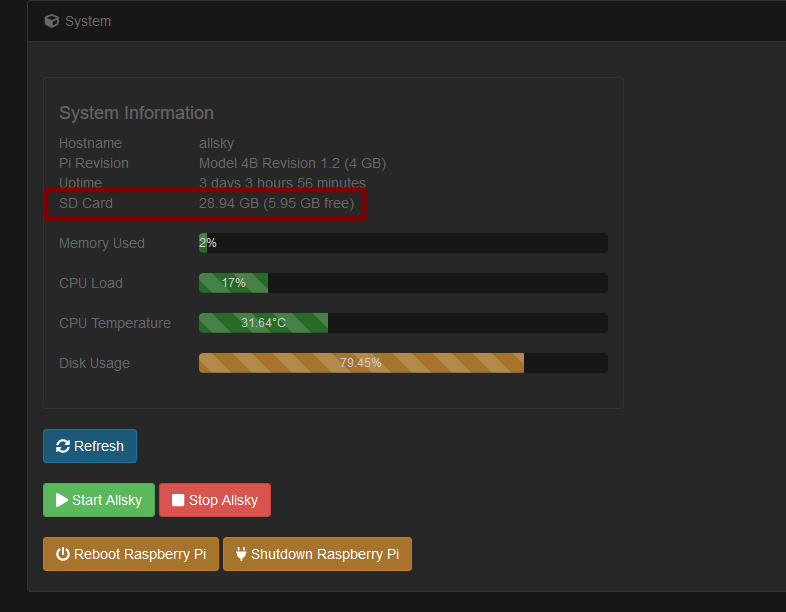 but your SD card is much bigger than 28 GB,
you need to resize your filesystem:
but your SD card is much bigger than 28 GB,
you need to resize your filesystem:
sudo resize2fs /dev/sda2
It may ask you to run an fsck command then run the resize again.
If so, follow its instructions - you'll need to use sudo.
After the resize, you should have all your space reporting correctly.
Pi keeps rebooting after a few minutes
One user reported his Pi was stuck in a loop where it would continually reboot after a few minutes. He had removed power from his Pi while it was still running. He fixed the problem by shutting the system down as soon as it came up.
If you need to shut down your Pi do not simply unplug the power; instead, use thebutton on the WebUI's System page or via the command prompt:
sudo shutdown -r now
Lenses
Lenses need to be matched to your camera and your environment. If you're in an urban canyon, maybe you don't need a 180° lens. If you have light interference near the horizon you can create an artificial horizon, with a piece of black PVC pipe for example. If you're unsure of the field of view you can use a tool like Bintel to calculate the field of view on the sensor, or Stellarium to simulate the field of view.